
GrowBlocks vs Unity 6 WebGL: the same game built in both engines
For a 3D game that lives on the web, GrowBlocks came out ahead. The same game downloads 6.3 to 7.7 MB on GrowBlocks against 17.5 MB as a Unity 6 WebGL build, a change is playable after a page reload instead of a 7 to 11 minute web build, and multiplayer, hosting, player accounts and a game economy come with the engine.
Unity is still the stronger choice for console and native mobile games, and for teams who work in its editor.
I started building BLOCKBLADE, a sword adventure on GrowBlocks, on a Friday. By the end of the day it was playable: a chibi knight, goblin camps, ruins on a hill, combos, parries and rolls.
Then I got curious. Everyone is saying Unity 6 plus an AI model is the new way to build games. Would our game be better in Unity? I didn't want to guess, so I rebuilt BLOCKBLADE in Unity 6 with the same models and the same rules, played both in the same browser, and measured everything.
1. Players download less than half
The Unity 6 WebGL build of BLOCKBLADE weighs 17.5 MB. The GrowBlocks version weighs 6.3 to 7.7 MB, engine included. The Unity engine file alone (6.8 MB) is about the size of our whole game.
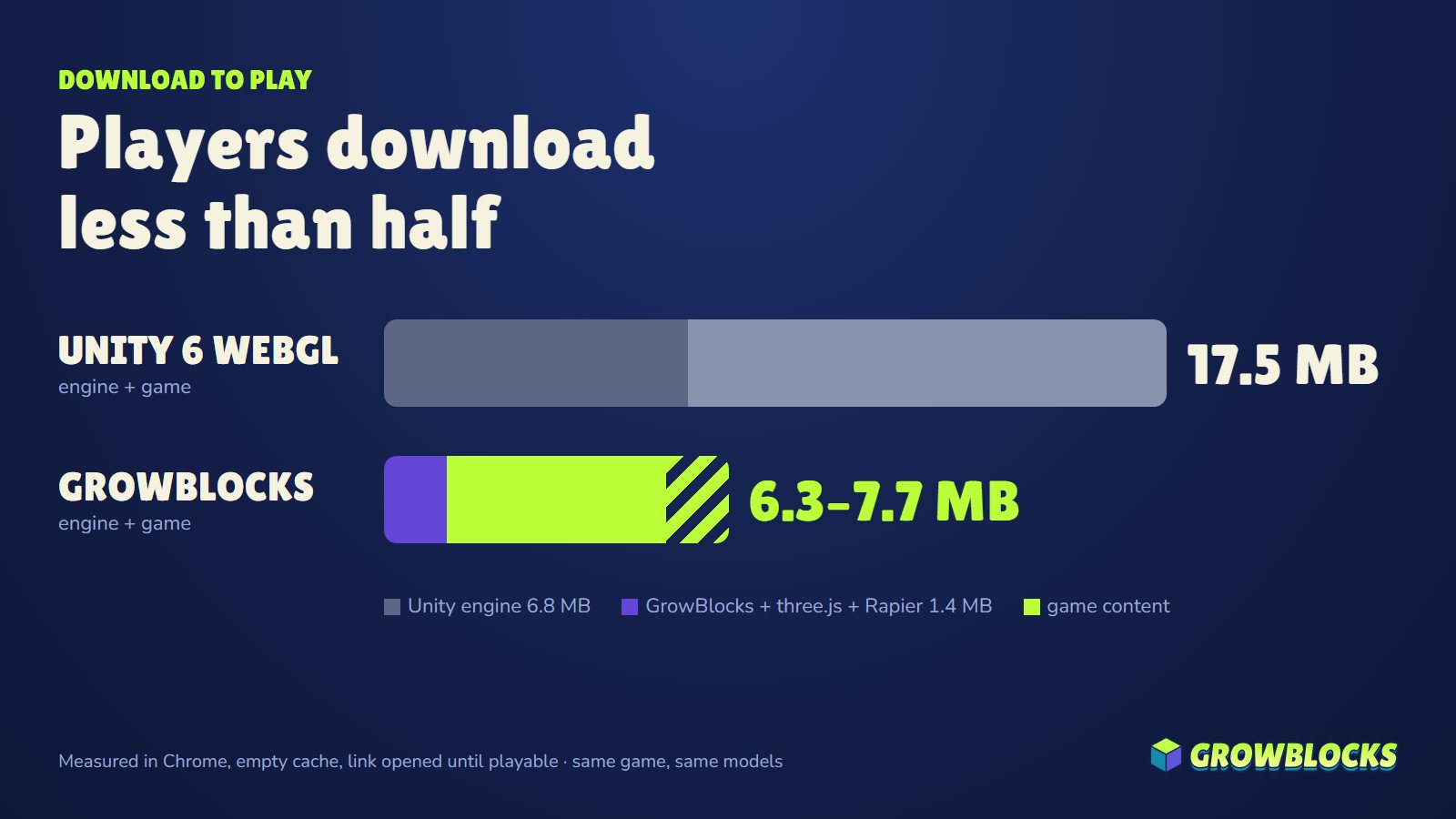
Both were measured in Chrome with an empty cache, from opening the link until the game was playable. On a phone on mobile data, that is the difference between a player who stays and a player who closes the tab. Unity even had the easy route: its build was served from a local PC, while GrowBlocks loaded its engine over the internet.
2. Every Unity test costs 7 to 11 minutes
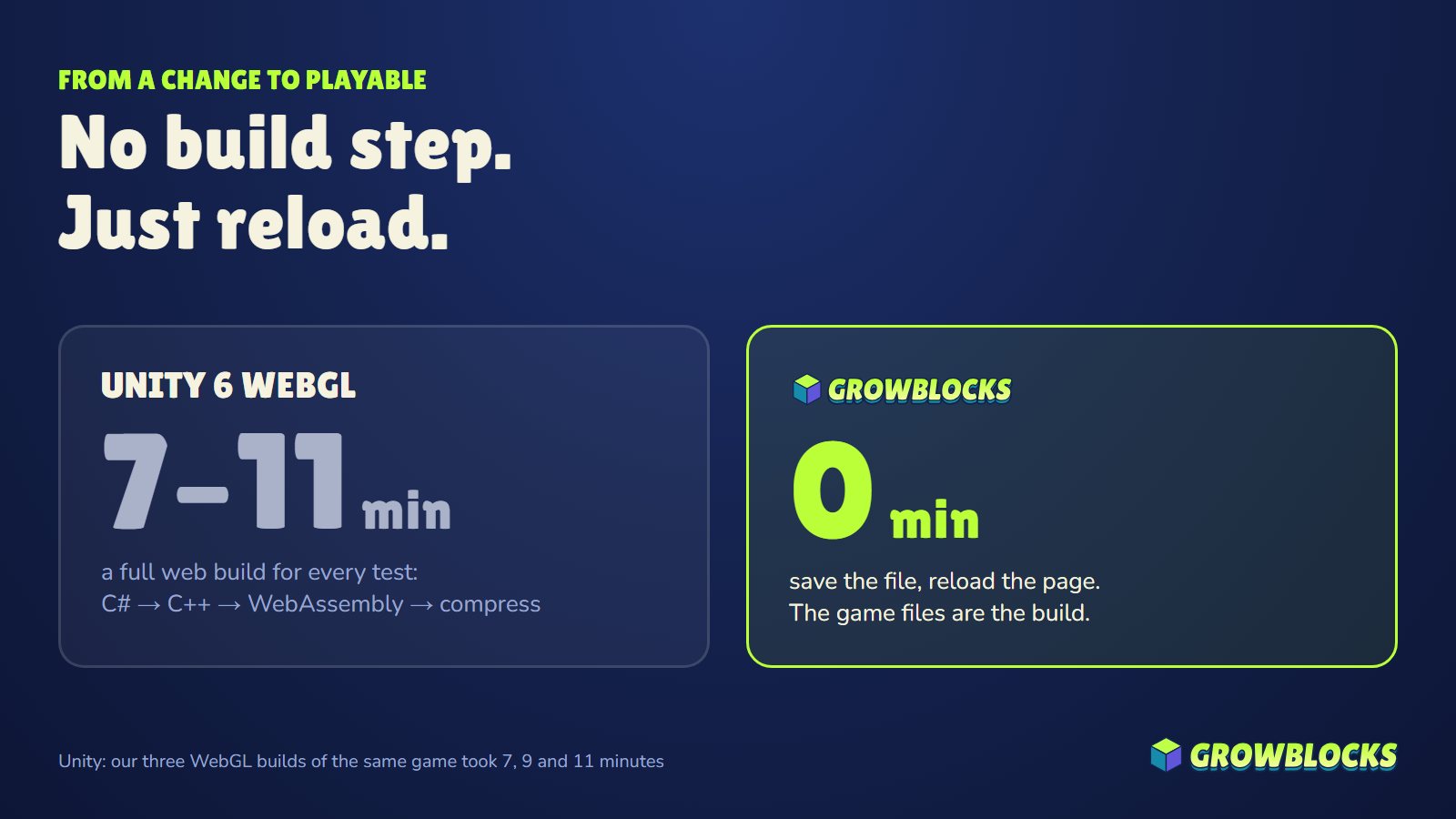
To see a change in the browser, Unity compiles C# to C++, then to WebAssembly, then compresses it. Our three web builds took 7, 9 and 11 minutes. A one-line fix to how the knight holds his sword cost the same as a new level.
On GrowBlocks there is no build step: save the file, reload the page, play. Over a day, that is the difference between trying five ideas and trying fifty.
3. Unity is built for an editor. GrowBlocks is built for an AI.
Unity lives in its editor. To let an AI assistant work on the Unity version, we had to close the editor and run Unity in batch mode, one script at a time, waiting minutes between steps.
The GrowBlocks Dev Kit was made for AI assistants from day one. Every game folder ships with the full API written for a model (llms.txt), instructions agents read by themselves (AGENTS.md, CLAUDE.md), a checker that plays the game headless and returns a screenshot, and an MCP server that can push a test build and submit it for review. BLOCKBLADE was built by an AI assistant from the first line.
4. The same models needed a whole pipeline in Unity
On GrowBlocks, a model goes in as it comes out of the AI art tools. In Unity, the same files needed work before they even looked right:
- Unity doesn't open GLB files without an extra package, so every model went through Blender.
- Unity can't read the models' WebP textures. Until we re-saved them all, the knight and the goblins were grey.
- Unity flips the axes, so every pillar and pier plank first landed on its side.
- The colours came out pale until we converted them for Unity's colour space.
None of it is hard for a Unity veteran. All of it is time spent before the game gets any better.
5. An engine is only the start
This was the biggest finding. Unity gave us a game. GrowBlocks gave us a game that already has players, multiplayer and an economy.
| Unity 6 WebGL | GrowBlocks | |
|---|---|---|
| Rendering, physics, animation | Included | Included (three.js r186, Rapier) |
| Multiplayer rooms | Add a networking package and a host | Built in: gb.net.join(), up to 16 players |
| Player accounts and wallets | Add a backend service | Built in |
| Hosting and a test link | Host the build yourself | One command: npx growblocks push |
| Game economy (NFTs, coin, 70% of fees) | Not part of the engine | Built in (testnet today) |
| Parts that pay their authors | Asset Store: sold once | Blocks: earn from every live game that uses them |
| AI decisions inside the game | Bring your own model and key | gb.ai (Sage), no key to manage |
| Made for AI assistants | Editor first | CLI, MCP server and a headless checker |
In Unity, each of those is a separate package, service, host or bill.
The revenue share is live on Robinhood Chain testnet only, paid in tPLAY test credits. It is not real money yet.
6. Thanks to Unity, we found a bug and fixed it
Playing both on a 144 Hz monitor, our knight felt sluggish. So we measured. On fast screens he ran at half speed and jumped half as high, because his movement read from physics that only updates 60 times a second. Every test machine before ran at 60 Hz, so nobody saw it.
We fixed it the same day: full speed and full jump at 60, 144 and 240 fps, with smoother animation for the knight and the goblins. That is the value of a fair test. You learn where you are strong, and you fix where you are not.
Where Unity is still the better choice
Unity is a great engine for console and native mobile games, for large teams who work in its editor, and for games that must ship to Steam or the app stores. The engine is licensed for games published on GrowBlocks only. You cannot export a GrowBlocks game to Steam, an app store or your own server, and you cannot self-host the engine. Your game code and art stay yours (terms).
What we took away
- GrowBlocks is versatile. It already runs a sword adventure, a kart racer, a shooter and a sports game, with any rigged character, multiplayer rooms, AI decisions and a game economy, from a few files of JavaScript.
- It is easier to use with an AI assistant. With the CLI and the MCP server, the assistant writes the game, plays it headless, checks its own screenshot and ships a test link. No editor, no build server, no waiting.
- The results live on the web. One link opens the game on any phone or laptop, with less than half the download.
- Digital assets are built in. Every game can have its own NFT collections, its own coin and items players earn, traded through GrowBlocks' secure screens. In Unity you would stitch together a wallet SDK, a marketplace and your own contracts.
Unity is still a great engine for console studios. For the games the web is waiting for, GrowBlocks is the better tool.
Questions people ask
- Is Unity 6 WebGL good for browser games?
- It works, but in our test the same game was 17.5 MB as a Unity 6 WebGL build against 6.3 to 7.7 MB on GrowBlocks, and each Unity web build took 7 to 11 minutes. For browser-first 3D games, a web-native engine loads faster and iterates faster.
- How big is a Unity 6 WebGL build?
- Our 3D sword game was 17.5 MB in total, of which the Unity engine file alone was 6.8 MB, measured in Chrome with an empty cache. The GrowBlocks engine with three.js and Rapier was 1.4 MB.
- Can I use the same 3D models in GrowBlocks and Unity?
- Yes. GrowBlocks loads GLB models directly, including rigged characters, with no conversion step. Unity needed them converted through Blender first. The same models were used in both versions of BLOCKBLADE.
- Can I export a GrowBlocks game to Steam or mobile like Unity?
- No. The GrowBlocks engine is licensed for games published on GrowBlocks, which run in the browser on PC and phone. If you need Steam, console or app-store builds, Unity is the better fit.
Try it in five minutes
npx growblocks new my-gameKeep reading
- A Unity alternative for small web gamesFor small 3D games that should load fast in a browser and work on phones, a web-native engine is often a better fit than a Unity WebGL build.
- Browser game engines compared: GrowBlocks, three.js, Babylon.js, PlayCanvas, GDevelop and RosebudA plain comparison of engines for 3D games in the browser in 2026: three.js, Babylon.js, PlayCanvas, GDevelop, Rosebud AI and the GrowBlocks Dev Kit, by what each one gives you and who it suits..
- How to build a multiplayer 3D browser game with Claude CodeStep by step: use Claude Code (or Cursor) with the GrowBlocks Dev Kit to build a multiplayer 3D game that runs in the browser on PC and phone, then publish it with no servers to set up..