
Add free 3D games to your Telegram group
Add @GrowblocksBot to your Telegram group and type /play. Your group gets free 3D multiplayer games that open inside Telegram: nobody downloads anything and nobody needs a wallet.
The bot also gives the group one-tap games with frens, a weekly ranking, and the Group Cup, where your group plays against every other group.
Add it now
Add the bot to your groupOpen the botSet it up in one minute
You do not need to be the group's admin. Anyone who can add members can add the bot.
- Open t.me/GrowblocksBot and tap Start.
- Tap Add GrowBlocks to your group.
- Pick your group from the list Telegram shows and confirm.
- The bot says hello in the group, with two buttons: Play with frens and Play solo.
- Type
/play, choose Play with frens or Play solo, and tap a game. That is the whole setup.
No Start button? Telegram only shows it the first time you open a bot. If you have used the bot before, type /start in its chat and the same buttons appear. You can also tap the bot's name at the top of the chat and choose Add to Group.
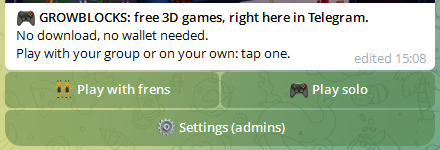
/play: two buttons. Admins also see Settings.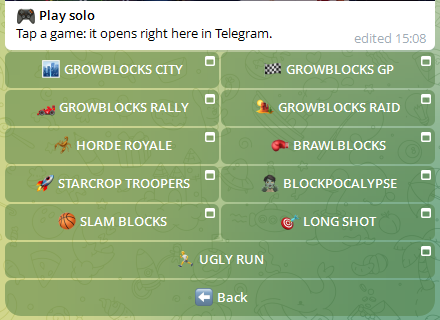
/play only to the bot that spoke last, unless the bot is an admin. As an admin it always hears you. In the bot's private chat, Add as admin does it in one step. It needs none of the admin rights: you can switch them all off, or leave only Pin messages. You can also tap commands from the / menu, or use the bot's buttons, instead of typing.The commands
| Command | What it does |
|---|---|
/play | Opens the menu: two buttons, Play with frens and Play solo. The games appear after you choose. |
/frens | Starts a game with frens. Add a game to skip the choice, for example /frens gp. |
/rankings | The group's top 10 by SEED earned this week. |
/cup | The Group Cup table: your group against other groups. |
/notify | Puts you on the list that is called when a scheduled game opens. |
/settings | For the group's admins: games, language, scheduled games and more. |
/help | A short reminder of all of the above. |
The bot keeps the chat tidy. A new menu replaces the previous one, and it answers one command every 10 seconds per group. You can also type @GrowblocksBot in any chat, even one where the bot is not a member, to drop a game card with a PLAY button.
Play with frens
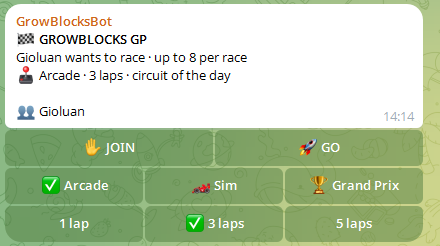
One message, three taps: JOIN, GO, PLAY. Everybody lands in the same room without typing a room code.
- Someone taps Play with frens on the menu (or types
/frens) and picks a game. They are the host. - Everyone who wants to play taps JOIN. The message lists who is in.
- The host taps GO. A group admin can tap it too.
- The bot pings everyone who joined, with one PLAY button.
- Tap PLAY. The game opens inside Telegram, already in the room with your frens.
- Big groups split into tables. If more people join than one game holds, the bot makes even tables. Ten players in a game of four become tables of 4, 3 and 3.
- Late is fine. Someone who taps PLAY without joining gets a free seat, or a new table.
- Short of players? In several games bots take the empty seats.
- The result comes back to the chat. When the game ends the bot posts the podium, with Play again and Group Cup buttons.
The games and their options
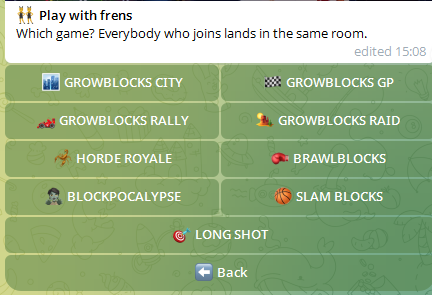
Nine games can be played with frens. In the three racing games the host sets the race with buttons under JOIN and GO. The defaults are already chosen, so JOIN and GO are enough.
| Game | What it is | Players | What the host can set |
|---|---|---|---|
| GROWBLOCKS CITY | Mine SEED, take a job, buy a home | Everyone | Nothing: everybody is in the same city |
| GROWBLOCKS GP | Circuit racing, arcade or simulation | Up to 8 | Arcade, Simulation or Grand Prix; 1, 3 or 5 laps (Grand Prix 10 or 20); PRO car |
| GROWBLOCKS RALLY | Rally stages, frens race live as ghosts | Up to 4 | The stage, from 11; damage on or off |
| GROWBLOCKS RAID | Desert raid, stage by stage | Up to 6 crews | Sprint (3 stages) or Full raid (13); damage on or off |
| HORDE ROYALE | Mini strategy game with four factions | Up to 4 | Nothing: bots fill empty seats |
| BRAWLBLOCKS | Arena brawler | Up to 6 | Nothing: 1v1, 2v2, 3v3 or free for all by how many join |
| BLOCKPOCALYPSE | Co-op zombie survival | Up to 6 | Nothing |
| SLAM BLOCKS | Arcade basketball | 1v1 or 2v2 | Nothing |
| LONG SHOT | Sniper duels across the city | 1v1 | Nothing: the group is paired into duels |
On a phone the games open full screen. On a computer the Telegram window stays medium so people can play and chat, with a FULL SCREEN button at the top.
Rankings and the Group Cup
Every week your group has its own ranking, and the group itself competes against other groups.
/rankings shows the group's top 10 players by SEED earned this week. SEED is what you earn by playing. The ranking counts the people who play from Telegram in that group.
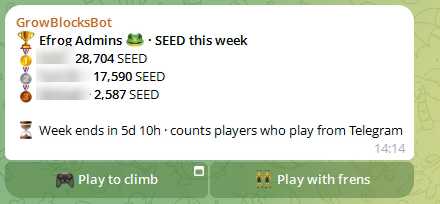
/rankings in a group (player names blurred)./cup shows the Group Cup. A group's score is the SEED its 10 best players earn in the week, so a group of 10 keen players can beat a group of 10,000.
- The week runs Monday to Sunday and resets at 00:00 UTC on Monday.
- On Monday the bot tells every group that scored where it finished.
- The winning group gets a trophy next to its name in the table.
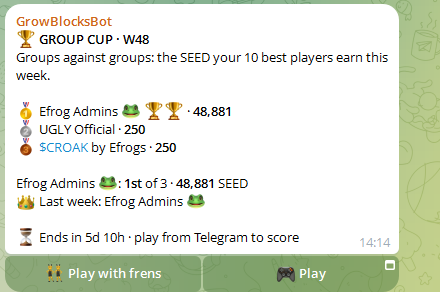
/cup: groups against groups, every week.Settings for admins
Group admins type /settings, or tap Settings (admins) under the games menu, and get one message of buttons. Each tap changes the setting at once, and the Help button explains every one. Groups that never open it keep the defaults.
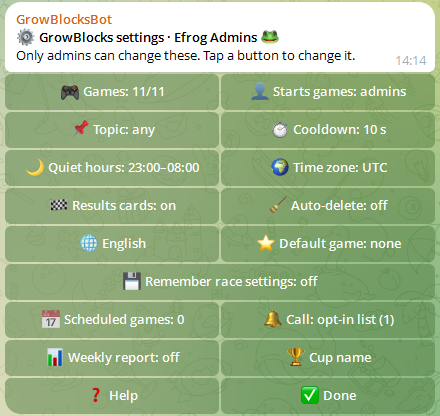
| Setting | What you can choose |
|---|---|
| Games | Hide games you do not want in the group |
| Who starts games | Everyone, or admins only |
| Topic | Lock the bot to one topic |
| Cooldown | 10, 30, 60 or 120 seconds between commands |
| Quiet hours | A night window with no results cards |
| Time zone | Your group's clock, for quiet hours, scheduled games and the report |
| Results cards | On, off, or always in one topic |
| Auto-delete | Old lobbies and results cards removed after 1, 6 or 24 hours |
| Language | English, Español, Português, Türkçe, 中文, 日本語 |
| Default game | /frens alone opens your group's favourite without asking which game |
| Remember race settings | The next lobby starts with the race the last host chose |
| Scheduled games | Up to five a week: the bot opens the lobby by itself |
| Call list | Who is called when a scheduled game opens; members join with /notify |
| Weekly report | Players, games with frens, SEED and your Group Cup place, once a week |
| Cup name | /settings cupname YOUR NAME sets how the group shows in the Group Cup |
Scheduled games start a few minutes after the hour, not on the exact minute.
SEED and your account
Opening a game from Telegram signs you in with your Telegram account, so your SEED is saved from the first game.
Already play on growblocks.xyz? Sign in there, open the City menu and tap Link Telegram. The bot asks you to confirm, and from then on your SEED is the same in both places.
Questions people ask
- How do I add games to a Telegram group?
- Open @GrowblocksBot in Telegram, tap Add GrowBlocks to your group and pick the group. Then type /play in the group, choose Play with frens or Play solo, and tap a game. The games open inside Telegram with no download.
- Does the GrowBlocks bot need admin rights?
- Not in a group where it is the only bot. In a group with other bots, make it an admin so it always receives your commands. It needs none of the admin rights.
- Does the bot read the group's messages?
- No. It does not read or store what people write in the group. It remembers the group's name and the people who use its commands and buttons, so it can build the ranking.
- Will it spam the group?
- No. One menu at a time, one command every 10 seconds, and a game with frens is a single message that updates in place.
- Does it work in groups with topics?
- Yes. The bot answers in the topic where the command was typed, and admins can lock it to one topic.
- Is the GrowBlocks Telegram bot free?
- Yes. The bot and the games are free.
- How do we remove it?
- Remove it like any other member. The group leaves the Group Cup.
Add it to your group
Add the bot to your groupPlay the gamesKeep reading
- How to build a multiplayer 3D browser game with Claude CodeStep by step: use Claude Code (or Cursor) with the GrowBlocks Dev Kit to build a multiplayer 3D game that runs in the browser on PC and phone, then publish it with no servers to set up.
- A Roblox and Fortnite UEFN alternative for game creatorsHow GrowBlocks compares with Roblox and Fortnite UEFN for creators who want to make and publish their own multiplayer games.